Are you a dedicated PC gamer balancing work, family, and your passion for Roblox, only to be frustrated by lag, slow loading times, or unexpected crashes? You are not alone. Many US gamers, who often dedicate significant hours weekly, seek simple yet effective ways to optimize their experience without heavy investments. This comprehensive guide on how to clear Roblox cache on PC is designed for you. Discover quick, easy, and safe steps to revitalize your Roblox gameplay, boost performance, and ensure your limited gaming time is spent enjoying immersive worlds rather than battling technical hiccups. Understand why clearing your cache is a critical maintenance step for any PC gamer focused on smooth, uninterrupted fun and connectivity in a world increasingly dominated by social and mobile gaming trends. Get ready to reclaim your peak Roblox performance today.
Related gamesWhy Does Roblox Performance Degrade Over Time On My PC?
Roblox performance can degrade on your PC due to the accumulation of cache files. As you play various games and explore different experiences, Roblox stores temporary data like textures, sounds, and scripts locally to speed up future loading. Over time, this cache can become bloated, containing outdated or corrupted files that slow down the game, cause lag, or lead to crashes instead of helping performance. Regular maintenance, like clearing the cache, is crucial to prevent this slowdown and maintain a smooth gaming experience.
How Can I Tell If My Roblox Lag Is Due To Cache Issues?
You can often suspect cache issues if you experience increasing lag, longer loading screens, frequent game crashes without clear error messages, or visual glitches like missing textures, even when your internet connection is stable and your PC meets Roblox's system requirements. If these problems arise consistently across different Roblox games and after system updates, a cluttered or corrupted cache is a very likely culprit preventing optimal performance.
Is It Possible To Clear Roblox Cache Without Losing My Game Settings?
Yes, clearing the Roblox cache typically does not affect your personalized game settings. Most Roblox settings, such as graphics quality, sound preferences, and keybinds, are stored either locally in a separate configuration file or linked to your Roblox account on their servers. The cache primarily stores temporary game assets. Deleting the cache means Roblox will re-download necessary assets, but your personal preferences should remain intact, allowing for a seamless return to your customized gaming environment.
What's The Safest Way To Clear Roblox Cache On A Windows PC?
The safest and most effective way to clear Roblox cache on a Windows PC is the manual method. This involves closing Roblox entirely, then using the Run dialog box (Windows key + R) to navigate to %temp% and %localappdata% folders. Inside %temp%, delete all files you can skip those in use. Then, in %localappdata%, locate and delete the entire 'Roblox' folder. This process is secure, targets the specific cache files, and does not risk your game progress or account data.
Why Is Clearing Cache Important For Adult Gamers Who Balance Life And Play?
For adult gamers balancing jobs, families, and life, clearing the Roblox cache is important because it directly optimizes their limited gaming time. Preventing lag, crashes, and slow loading means more uninterrupted relaxation, social interaction, and skill-building within Roblox. It’s a quick, free fix that avoids frustrating technical issues, ensuring that precious moments dedicated to gaming are spent enjoying the experience rather than troubleshooting, making every session more valuable and rewarding.
Can Corrupted Cache Files Cause Roblox To Not Launch At All?
Yes, severely corrupted or excessively large cache files can indeed prevent Roblox from launching at all. If the Roblox client cannot properly read or process its cached data during startup, it can lead to launch failures, getting stuck on the loading screen, or immediate crashes to the desktop. Clearing these problematic cache files often resolves such critical launch issues, allowing the Roblox application to perform a fresh installation of necessary temporary assets and start correctly.
Will Clearing Cache Improve My FPS In Roblox Games?
Clearing the Roblox cache can often lead to an improvement in your Frames Per Second (FPS) in Roblox games. By removing old, corrupted, or unnecessary temporary files, your PC's system resources (like CPU and RAM) are freed from processing this junk data. This allows your computer to dedicate more resources to rendering the game in real-time, resulting in smoother gameplay, fewer frame drops, and a more stable, higher FPS, especially in busy or graphically demanding Roblox experiences.
Is It Necessary To Clear Cache If My PC Is High-End?
Yes, even if you have a high-end PC, clearing the Roblox cache is still beneficial and often necessary. While a powerful system can brute-force through some inefficiencies, a bloated or corrupted cache can still introduce lag, crashes, or slow loading times regardless of your hardware. A high-end PC deserves optimized software, and regular cache clearing ensures Roblox runs at its absolute best, taking full advantage of your system's capabilities for a consistently premium gaming experience.
What Are The Risks If I Never Clear My Roblox Cache?
If you never clear your Roblox cache, you risk a gradual but consistent degradation of your gaming experience. This includes increasing lag, longer loading times, more frequent game crashes, visual glitches, and potential error messages. Furthermore, a perpetually growing cache can consume significant disk space on your PC. Eventually, these issues can make Roblox unplayable or severely diminish the enjoyment, forcing you to troubleshoot more complex problems down the line.
As a busy gamer balancing life, work, and the joy of diving into Roblox's endless worlds, nothing is more frustrating than lag, stuttering, or games that refuse to load. You carve out precious moments for relaxation, fun, or skill-building with friends online, only to have them interrupted by technical glitches. Recent US gaming statistics show that 87% of gamers play regularly, many dedicating 10 or more hours weekly. For this dedicated group, performance optimization isn't just a luxury; it's essential for maximizing their limited, valuable gaming time. This is where learning how to clear Roblox cache on PC becomes a game-changer. It's a simple, free, yet incredibly effective maintenance step that can significantly improve your Roblox experience, getting you back into the action faster and smoother. Think of it as giving your gaming rig a quick, digital tune-up, ensuring your virtual adventures are always at their peak.
You want solutions that are practical, quick, and don't require a computer science degree. This guide is crafted specifically for you, providing clear, step-by-step instructions to understand, identify, and effectively clear your Roblox cache on PC. We'll demystify what the cache is, why it builds up, and most importantly, how to confidently clean it without risking your game progress or settings. By the end of this article, you'll be equipped with the knowledge to maintain a consistently smooth Roblox experience, letting you focus on what truly matters: having fun and connecting with friends in your favorite virtual spaces, whether you're exploring a new experience or dominating an obby.
What Exactly Is The Roblox Cache And Why Does It Accumulate?
The Roblox cache is essentially a collection of temporary files that your PC stores to help Roblox load games faster and run more efficiently. When you play a game, Roblox downloads assets like textures, sounds, scripts, and other data. Instead of re-downloading these every single time you launch the same game or even visit similar experiences, your computer saves them in a special cache folder. This is a common practice across many applications and games, designed to improve performance and reduce loading times.
While this system is designed for speed, over time, this cache can become bloated. It accumulates outdated, corrupted, or simply too many unused files. Imagine a digital junk drawer that keeps getting filled but never organized. Each time you play a new game, explore a different map, or even if a game updates its assets, new data gets added. Eventually, this accumulation can hinder performance rather than help it, leading to slower load times, inexplicable lag, visual glitches, or even crashes. For busy gamers, these disruptions can quickly turn a fun session into a frustrating one.
Is Clearing The Roblox Cache Safe And What Are The Benefits?
Yes, clearing the Roblox cache is completely safe and poses no risk to your game progress, purchases, or account information. Cache files are temporary data; they are not your game saves, personal settings, or Robux balance. When you delete them, Roblox simply re-downloads any necessary assets the next time you launch an experience. The immediate benefits are often noticeable and can significantly improve your gaming quality of life, which is crucial for those who game to unwind after a long day.
The primary benefits include a noticeable boost in game performance, such as reduced lag and smoother frame rates, especially in graphically intensive or popular experiences. You'll likely experience faster loading times when joining games, as corrupted or old cache files are no longer causing delays. Furthermore, clearing the cache can resolve various in-game bugs, graphical glitches, and unexpected crashes, which are common pain points for many PC gamers. It also frees up valuable disk space on your PC, a nice bonus for those managing storage on a budget. In an environment where social gaming is key, as highlighted by recent trends, a stable connection and smooth gameplay ensure you can truly enjoy those moments with friends.
How Do I Manually Clear The Roblox Cache On My Windows PC?
Clearing your Roblox cache manually on a Windows PC is a straightforward process. It involves navigating to specific folders and deleting their contents. Before you begin, ensure Roblox is completely closed, including any background processes. This prevents file access issues during deletion.
Here are the steps:
Close Roblox: Make sure the Roblox Player and Roblox Studio are completely shut down. Check your system tray in the bottom right corner of your taskbar for any lingering Roblox icons and exit them.
Open Run Dialog: Press the Windows key + R simultaneously on your keyboard. This will open the Run dialog box.
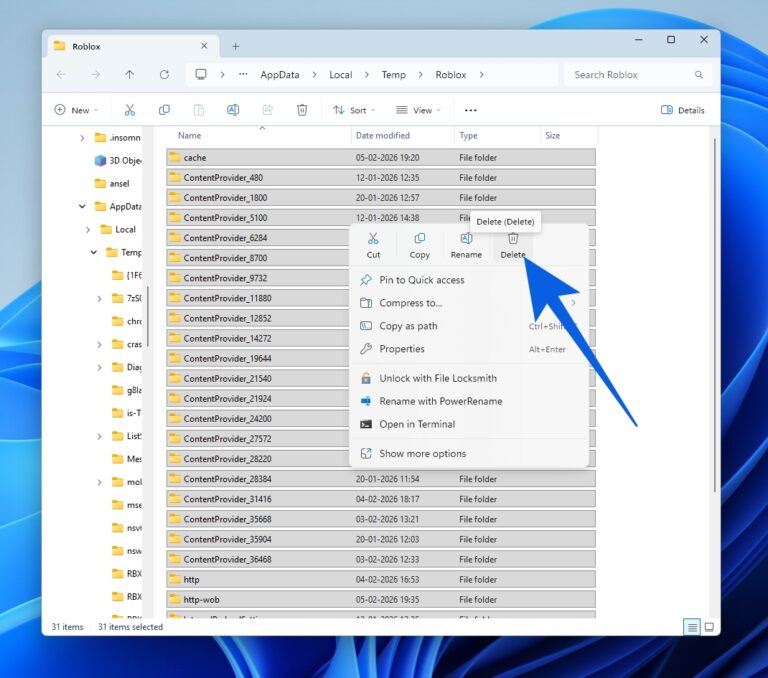
Navigate to Temp Folder: In the Run dialog box, type %temp% and press Enter. This will open your local AppData's Temp folder, which is where many temporary files, including some Roblox cache elements, reside.
Delete Temp Files: Once in the Temp folder, select all files and folders (Ctrl + A) and press Delete. You might encounter a prompt saying some files are in use; simply click Skip for those. These are usually system files that Windows is actively using and cannot be deleted.
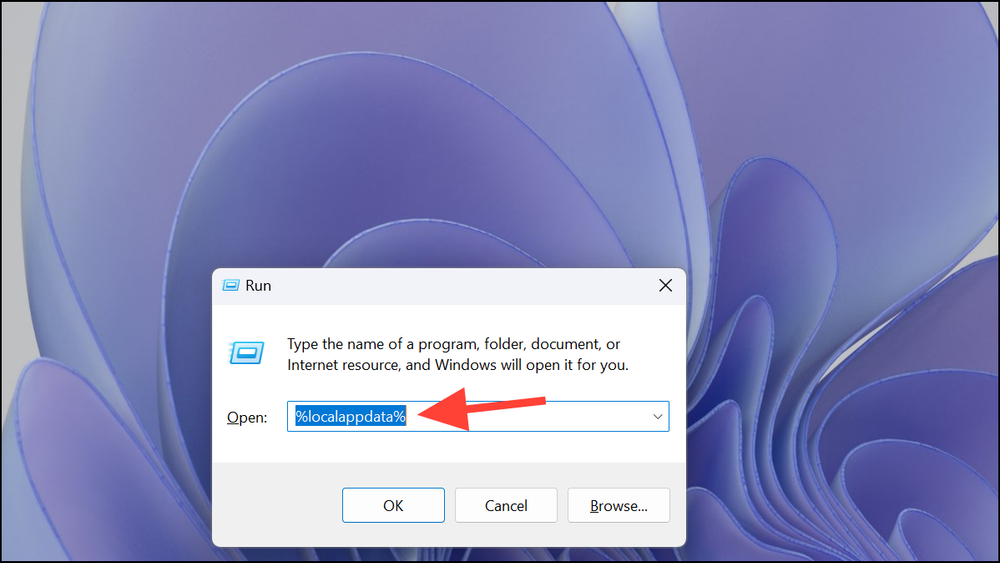
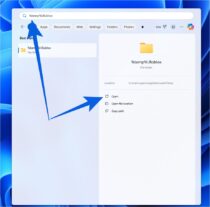
Navigate to Roblox Specific Cache: Repeat step 2 (Windows key + R). This time, type %localappdata% and press Enter. This will take you to your local AppData folder.
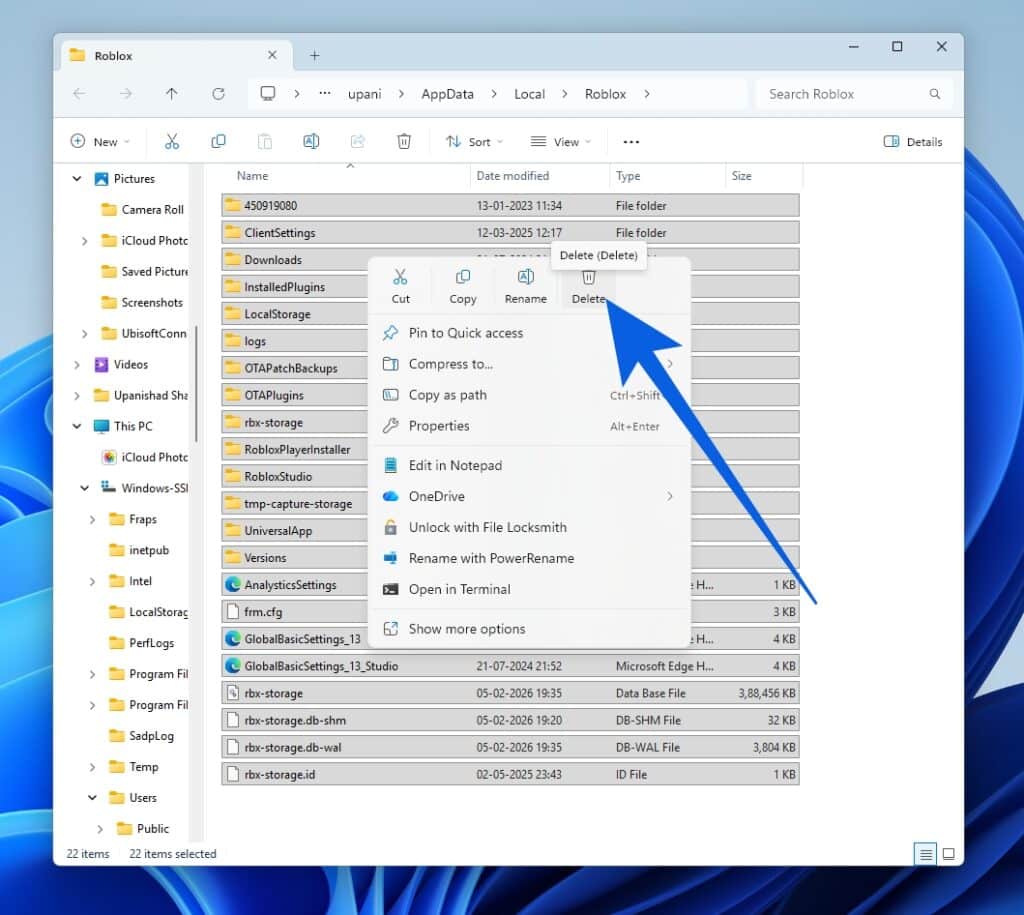
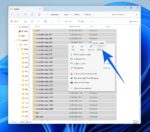
Find and Delete Roblox Folder: In the AppData folder, locate the 'Roblox' folder. Right-click on it and select Delete. Confirm the deletion if prompted. This folder contains the main cache and other temporary Roblox data. Note that this will also remove any downloaded plugin files if you use Roblox Studio, but they will be re-downloaded upon next use.
Empty Recycle Bin: For a complete cleanup, right-click on your Recycle Bin on your desktop and select 'Empty Recycle Bin'. This permanently removes the deleted cache files from your system.
After following these steps, restart your PC for optimal results, then launch Roblox and enjoy a potentially smoother experience. The first load might be slightly longer as assets are re-downloaded, but subsequent loads should be much quicker.
Are There Any Other Methods Or Tools To Clear Roblox Cache?
While the manual method is effective and highly recommended as it targets the specific Roblox cache folders, some users might look for alternative or complementary approaches. One popular method involves using Windows' built-in Disk Cleanup utility, though it's less specific to Roblox.
To use Disk Cleanup:
Search for Disk Cleanup: Type 'Disk Cleanup' in your Windows search bar and open the application.
Select Drive: Choose the drive where Windows is installed (usually C: drive) and click OK.
Select Files to Delete: Once it scans, scroll through the list and check 'Temporary files,' 'Temporary Internet Files,' and 'Recycle Bin.' You can also click 'Clean up system files' for more options.
Confirm: Click OK and then 'Delete Files' to confirm.
This method cleans general temporary files, which may include some Roblox-related data but won't be as thorough as the manual deletion of the specific Roblox folder. For busy gamers seeking quick fixes, third-party PC cleaner software like CCleaner also exists. While these tools can effectively clear temporary files, exercise caution: always download them from official sources, read reviews, and understand what they are deleting to avoid inadvertently removing essential system files. For Roblox, the manual method remains the most targeted and safest approach.
How Often Should I Clear My Roblox Cache For Optimal Performance?
The frequency with which you should clear your Roblox cache depends largely on your gaming habits and PC performance. For the average gamer who enjoys Roblox regularly, a good rule of thumb is to clear the cache once every month or two. This proactive maintenance helps prevent excessive build-up and keeps your system snappy. However, if you're a hardcore Roblox enthusiast who jumps between many different games daily, experiences frequent crashes or lag, or notices increasingly slow load times, you might benefit from clearing it more often – perhaps once every two to three weeks.
Furthermore, it's highly recommended to clear your cache immediately after a major Roblox update, a Windows update, or if you start encountering persistent issues like game not loading, unexpected shutdowns, or specific graphical glitches that weren't present before. Many adult gamers juggle responsibilities, and losing precious gaming time to troubleshooting is a pain point. Making cache clearing a regular, quick task can save you significant frustration and ensure your relaxation time is truly relaxing. Just like backing up important work files, regular cache maintenance is a small investment for a much smoother experience.
Will Clearing The Roblox Cache Delete My Game Progress Or Purchases?
This is a common and understandable concern among gamers, especially those who have invested time and money into their Roblox experiences. The good news is, absolutely not. Clearing your Roblox cache will not delete your game progress, any Robux you've purchased, your inventory items, or any builds you've created. Roblox stores all critical player data, including game saves, purchases, and account information, on its secure cloud servers. These servers are separate from the temporary cache files stored on your local PC.
Think of it this way: the cache on your PC is like a local library's index of popular books. If you throw out the index, the books (your game data) are still safely in the main, cloud-based library. The next time you visit, a new index will be created. The only 'data' you might temporarily lose are some graphical assets that Roblox will simply re-download upon your next game launch. So, you can clear your cache with complete peace of mind, knowing that your hard-earned progress, beloved avatars, and valuable Robux are all safe and sound on Roblox's servers, ready for you whenever you log back in. This peace of mind is invaluable for gamers who want to enjoy their hobby without worrying about data loss.
What Are The Common Signs My Roblox Cache Needs Clearing?
Knowing when your Roblox cache needs attention can save you from unnecessary frustration and keep your gaming experience enjoyable. For many adult gamers, recognizing these signs quickly means more play and less troubleshooting. Here are some of the most common indicators that it's time to clear your Roblox cache:
Increased Lag and Stuttering: Even on a decent PC, if games that usually run smoothly start experiencing noticeable lag, frame drops, or stuttering, a bloated cache could be the culprit.
Slow Loading Times: If it takes an unusually long time to load into a game or transition between areas within an experience, it's a strong sign the cache is struggling to process old data efficiently.
Frequent Crashes: When Roblox applications (Player or Studio) frequently crash without a clear error message, especially when loading or mid-game, a corrupted cache might be causing instability.
Graphical Glitches or Missing Textures: Seeing odd visual artifacts, textures not loading correctly, or even parts of the game world appearing invisible can often be traced back to corrupted or outdated cached assets.
Roblox Not Launching: In more severe cases, an extremely corrupted cache can prevent the Roblox Player from launching altogether or getting stuck on the loading screen.
Performance Degradation Over Time: If your Roblox experience has slowly but steadily declined in performance, even when your internet connection is stable, it's a clear signal that accumulated cache files are taking their toll.
Excessive Disk Space Usage: If you regularly monitor your disk space, you might notice the Roblox application folder growing disproportionately large, indicating a significant cache build-up.
By keeping an eye out for these symptoms, you can proactively address performance issues and ensure your Roblox sessions remain fluid and fun, allowing you to fully enjoy social play and skill-building.
How Does A Clean Cache Contribute To A Better Social Gaming Experience?
In today's gaming landscape, social interaction is paramount. US gaming trends consistently highlight the importance of connecting with friends online, with platforms like Roblox and Discord serving as virtual hangouts. A clean Roblox cache directly contributes to a superior social gaming experience in several key ways. Firstly, reduced lag and smoother frame rates mean you can participate fully in group activities, whether it's a fast-paced minigame, a collaborative build, or simply exploring a new world. No one wants to be the player constantly disconnecting or freezing up during a crucial moment, disrupting the fun for everyone.
Secondly, faster loading times are critical for social coherence. When friends invite you to join a game, you want to jump in quickly, not be stuck on a loading screen for minutes while everyone else is already playing. A clean cache ensures you can join the action almost instantly, maintaining the flow of conversation and camaraderie. Finally, by resolving crashes and glitches, a clean cache provides a more reliable platform for sustained social interaction. You won't have to constantly rejoin games or apologize for technical difficulties, allowing for uninterrupted chats, strategizing, and shared laughter. For gamers who use Roblox as a vital social space, optimizing performance through cache clearing means optimizing their connection with friends and enhancing the overall joy of shared virtual adventures.
Can Clearing Cache Help With Roblox Studio Performance Too?
Absolutely, clearing the cache can significantly benefit Roblox Studio performance, not just the Player application. Many adult gamers, alongside their play, also enjoy creating and developing within Roblox Studio, leveraging its tools to build their own experiences. Just like the Player, Roblox Studio relies on cached assets and temporary files to speed up workflows, load projects, and display assets efficiently. Over time, as you work on multiple projects, import various assets, and test different game versions, Studio's cache can become bloated with outdated or unused data.
When Studio starts to lag, experiences slow asset loading, crashes during complex operations, or displays unexpected errors, a primary culprit can be a cluttered cache. Clearing it can help streamline resource loading, improve responsiveness, and reduce instability, allowing for a smoother and more enjoyable development experience. This is crucial for creators who might only have limited time to work on their projects, ensuring that their valuable creative hours are spent building, not battling performance issues. Treat your Studio's cache clearing as part of your regular developer maintenance routine to keep your creative flow uninterrupted.
The Roblox cache, while designed to enhance your experience, can become a bottleneck over time. Understanding how to clear roblox cache on pc is a fundamental skill for any PC gamer seeking to maintain peak performance and enjoy their time in Roblox's vast universe without frustrating interruptions. It's a simple, free, and non-destructive way to breathe new life into your games, reduce common technical headaches, and ensure your PC is always ready for your next adventure. By incorporating this quick maintenance step into your routine, you'll spend less time troubleshooting and more time exploring, building, and connecting with friends.
What's your biggest gaming challenge when it comes to PC performance? Comment below and let's conquer it together!
FAQ Section: Your Quick Answers
Will clearing Roblox cache delete my account?
No, clearing the Roblox cache will not delete your account. Your account information, game progress, and purchases are stored on Roblox's cloud servers, not locally on your PC. Cache files are only temporary data for faster loading.
How often should I clear the Roblox cache?
For most regular players, clearing the Roblox cache every 1-2 months is sufficient. If you frequently experience lag, crashes, or play many different games, consider doing it every 2-3 weeks, or after major game/system updates.
Can clearing cache fix Roblox error codes?
Yes, clearing the cache can often resolve various Roblox error codes, especially those related to asset loading, game corruption, or general client instability. It's a recommended first troubleshooting step for many issues.
What is the difference between Roblox cache and temporary files?
Roblox cache is a specific type of temporary file generated by the Roblox application itself to store game assets. General temporary files (%temp%) include other temporary data from various applications, but clearing both helps overall system and Roblox performance.
Do I need to restart my PC after clearing Roblox cache?
While not strictly mandatory, restarting your PC after clearing the Roblox cache is highly recommended. It helps ensure that all temporary files are properly flushed and that Windows fully recognizes the changes, leading to more stable performance.
Will clearing the cache make my internet faster for Roblox?
Clearing the cache does not directly make your internet faster. However, by removing old or corrupted files that might be causing re-downloading issues or processing delays, it can make your Roblox experience *feel* faster by reducing loading times and improving game stability, thus optimizing how your internet speed is utilized.
Improve Roblox performance, Reduce lag and crashes, Speed up game loading times, Free up disk space on PC, Simple steps to delete cache, Safe process no game data loss, Essential for regular Roblox players, Boost overall gaming experience.
35


How To Clear Roblox Cache In Windows 10 11 Full Guide YouTube . How To Clear Roblox Cache YouTube . How To Clear Roblox Cache On PC And Mobile Beebom Arrow Pointing At Delete Icon In Windows 11 Context Menu Deleting The Roblox Folder To Clear Cache . How To Clear Roblox Cache Stop Lag Crashes Errors YouTube . How To Clear Roblox Cache On Windows 11 10 Improve Roblox Loading




How To Clear Roblox Cache On A Windows 11 PC Image 80 1 . How To Clear Roblox Cache Windows 11 I 2024 Tutorial YouTube . How To Clear Roblox Cache 2026 Guide Clear Local App Data On PC 1024x915 . How To Clear Roblox Cache Fix Loading Free Space 2026 YouTube . Roblox Running Slow Lets Clear That Cache Clear Roblox Cache On Mac


How To Clear Roblox Cache 2026 Guide Clear Roblox Cache On Mac . How To Clear Roblox Cache On A Windows 11 PC Image 81 1 . How To Clear Roblox Cache Files EASY Tutorial YouTube . How To Clear Roblox Cache On Windows 11 PC YouTube . How To Clear Roblox Cache On A Windows 11 PC Image 89 1


How To Clear Roblox Cache 2026 Guide Clear Temp Roblox Cache On PC 150x132 . How To Clear Roblox Cache 2026 Guide Temp Roblox Folder On Windows 210x207 . How To Clear Roblox Cache In Windows 11 YouTube . Clear Cache From Roblox In Windows 10 YouTube . HOW TO CLEAR ROBLOX CACHE FILES 2026 Easy Tutorial YouTube


Roblox Running Slow Lets Clear That Cache Mobile Clear Cache . How To Clear Roblox Cache 2026 Guide How To Clear Roblox Cache . How To Clear Roblox Cache Complete Details 3 Easy Ways Crazy Tech How To Clear Roblox Cache Complete Details . How To Clear Roblox Cache 2026 Guide Clear Temp Roblox Cache On PC 768x678 . How To Clear Roblox Cache On IPhone Roblox Cache



How To Clear Roblox Cache 2026 Guide Tap Storage Usage Then Tap Clear Cache On Android . How To Clear Roblox Cache On Windows Mac Android And IOS. How To Clear Roblox Cache On PC Android IOS How To Clear Cache In Roblox 150x84 . How To Update Roblox In 2026 Fix Error Code 280 On PC Mobile Xbox Roblox Update It.webp. How To Clear Roblox Cache PC IPhone IPad Android Gemini Generated Image


How To Clear Roblox Cache PC IPhone IPad Android Gemini Generated Image Scaled . How To Clear Roblox Cache PC IPhone IPad Android Image 354 . How To Clear Roblox Cache Windows 11 Clean Roblox Game YouTube . How To Clear The Cache Roblox On IPhone YouTube . How Do You Clear Roblox Cache Ultimate Guide Clear Roblox Cache On Android